
Let's Hangout

Need to set up a meeting with your teammate?
Let Google Assistant help you through the process by suggesting the best time to meet each other!
Define
Problem Statement
Scheduling for a group meeting can be tedious as information has to be exchanged regarding available time in team member's already busy schedules. Multiple exchanges amongst multiple users can be confusing and time consuming.
Based on our preliminary observation we identified following problems:
-
Students use multiple platforms to coordinate meetings.
-
Students have to communicate back-and-forth many times before setting a meeting time.
Research
Task Analysis &
Contextual Inquiry
We conducted contextual inquiry in the University of Toronto's Inforum library which is a collaborative work space where most Faculty of Information students meet for their group work. Observing users in the collaborative space helped us understand their behaviour, tools, and environments which users utilize to collaborate. With sample size of 9 users, we obtained information about the context of use, asked set of post-task questionnaires and generated model diagrams and affinity diagram to aid us in our design.


Ideate
Participatory Design
The goal of the participatory design session was to actively involve the potential user of the mobile application Google Mingle to achieve a user-centred design. Specifically, our three representative users (graduate students) applied their prior experience of chat based mobile applications to design a new interface that aids the process of meeting coordination. The participatory design session was conducted to ensure that the final product meets users’ needs and is usable.


Participatory design revealed the importance of the following:
-
Import
Not everyone is an active Google user. Import and syncing ability can connect to other productivity applications. -
Initiator/Administrator Role
There will always be the one person who creates the group. The initiators will have more control and access such as setting up meeting parameters.
-
Privacy control
Participants illustrated that when sharing their schedule, they did not necessarily want the teammates to know the reasoning behind it. -
Confirmation
Users will confirm the meeting time once it is announced in case the schedule changed from the initial input. This will be an iterative process where they can enter new availabilities.
Prototype
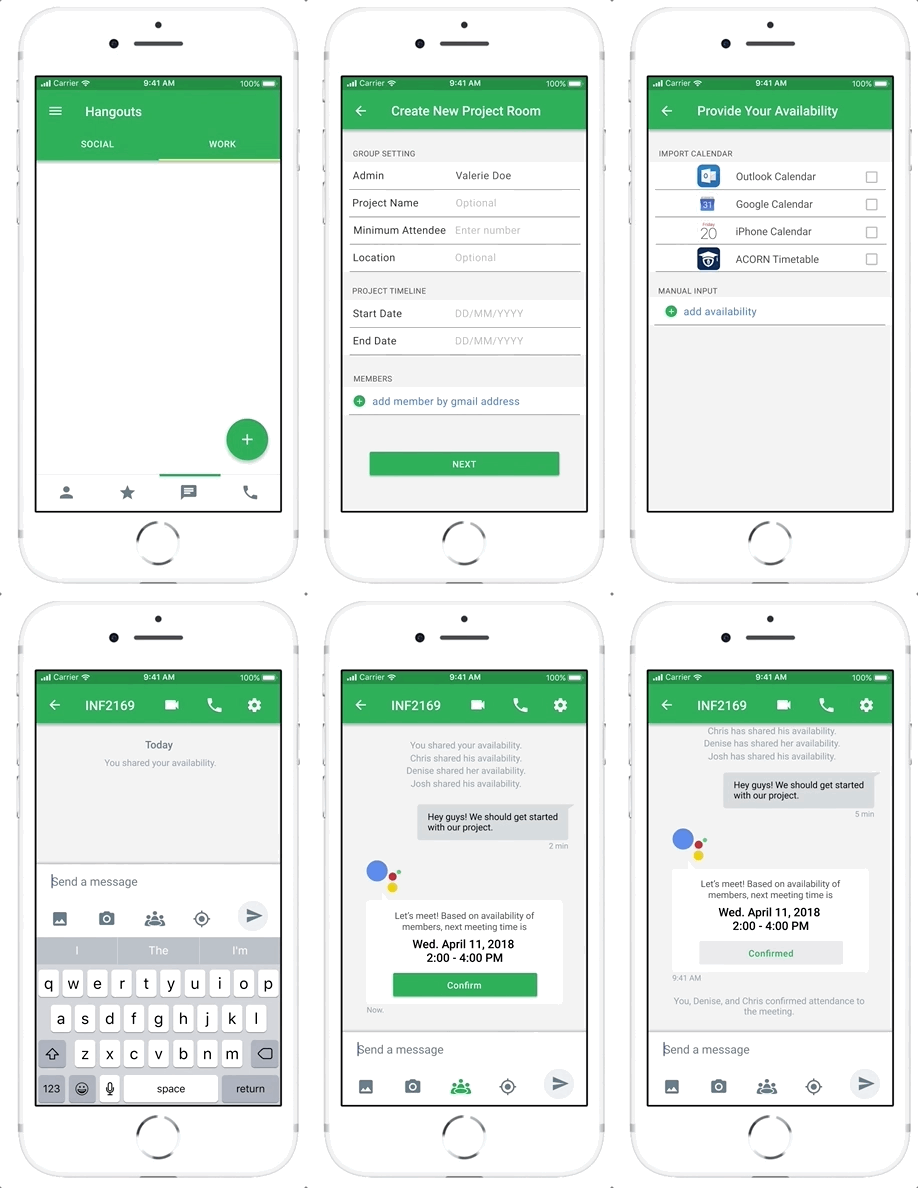
Initiator Screens
We designed two user interfaces for the two user types as identified through our research:
-
Initiator:
Actively collects group member's contact information, creates the group chat room, sets parameters (i.e. a minimum number of people required for a meeting) and initiates conversations.
-
Members:
Invited to the group chat and responds to messages.
Assumptions:
-
The user must input their availabilities in order to gain full access to the chat room.
-
The user may import from existing calendar apps or manually input their availabilities.
-
All members who have indicated as "available" at the suggested meeting time must confirm their participation or else the Google Assistant suggests another time.
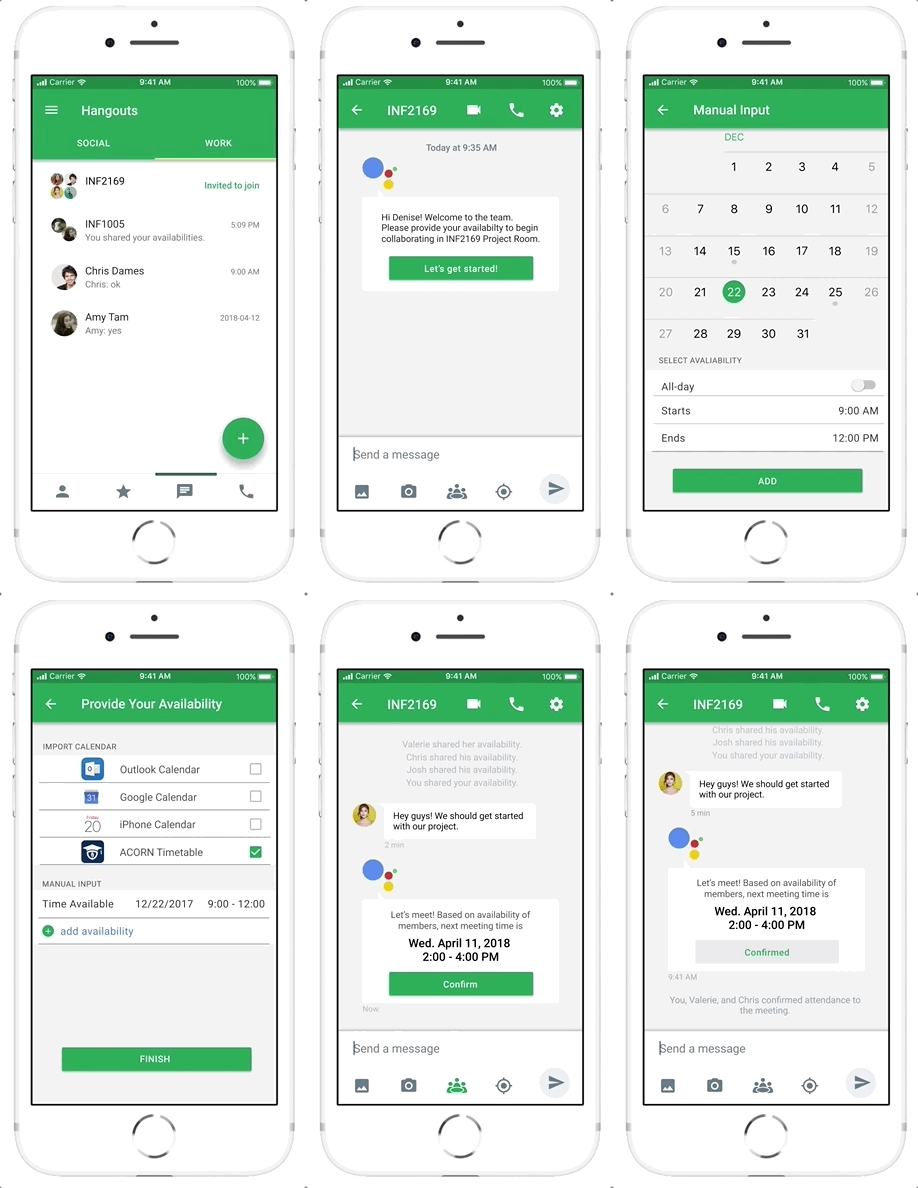
Member Screens
Test
A/B Testing
The objective of this AB testing was to identify the input method with highest usability to make meeting scheduling process faster and easier. We recruited 6 users, where we focused on the input method for sharing availability, which is a mandatory task for all users who create or are invited to the platform to begin collaborating with their group members. Users completed the each task with post-task questionnaire.
A: Manual Entry

B: Date & Time Picker

C: Date & Clock Picker

For each variable, the time it took to complete the task, the total number of clicks and the total number of clicks in “wrong” interaction was recorded to quantitatively measure efficiency, effectiveness, accuracy, affordance and ease of use. The test was randomized using Graeco-Latin Square. Central tendency, standard error, standard deviation, univariate static test, and Friedman test was used for statically analysis of the test. The familiarity of the input method was considered through information collected in the pre-test questionnaire.
Based on the study, the clock-view input method is the fastest input method. Time-picker is the most precise input method. Time-picker input method did not have better performance with familiar iPhone users.
A/B Testing
Key Findings
Highlights

User Centered Design
The design process adopted the UCD framework to give extensive attention to usability goals, user characteristics, environment, and tasks at each stage of the design process.
Involving real users through preliminary observation, task analysis, contextual inquiry, participatory design, focus group sessions, and A/B testing, we set the design requirements and validated our assumptions. Rather than forcing the users to change their behaviour to accommodate the application, our designs were optimized around how users currently use the application.
Co-designed with: Dandi Feng & Vicky Su
Takeaways
What have I learned from this project?
1
Composing ethics protocol application and consent form to conduct user research.
2
How to conduct, record data, and analyze task analysis, contextual inquiry, and A/B testing.
3
Designing for consistencty using the Google Material Design.
What would I have done differently?
1
Design prototypes with increased accuracy in user interaction for user testing sessions.
2
Seek more appropriate user testing environments that resemble the real use case.
3
Recruit diverse and differing participants for contextual inquiry, participatory design, and A/B Testing.